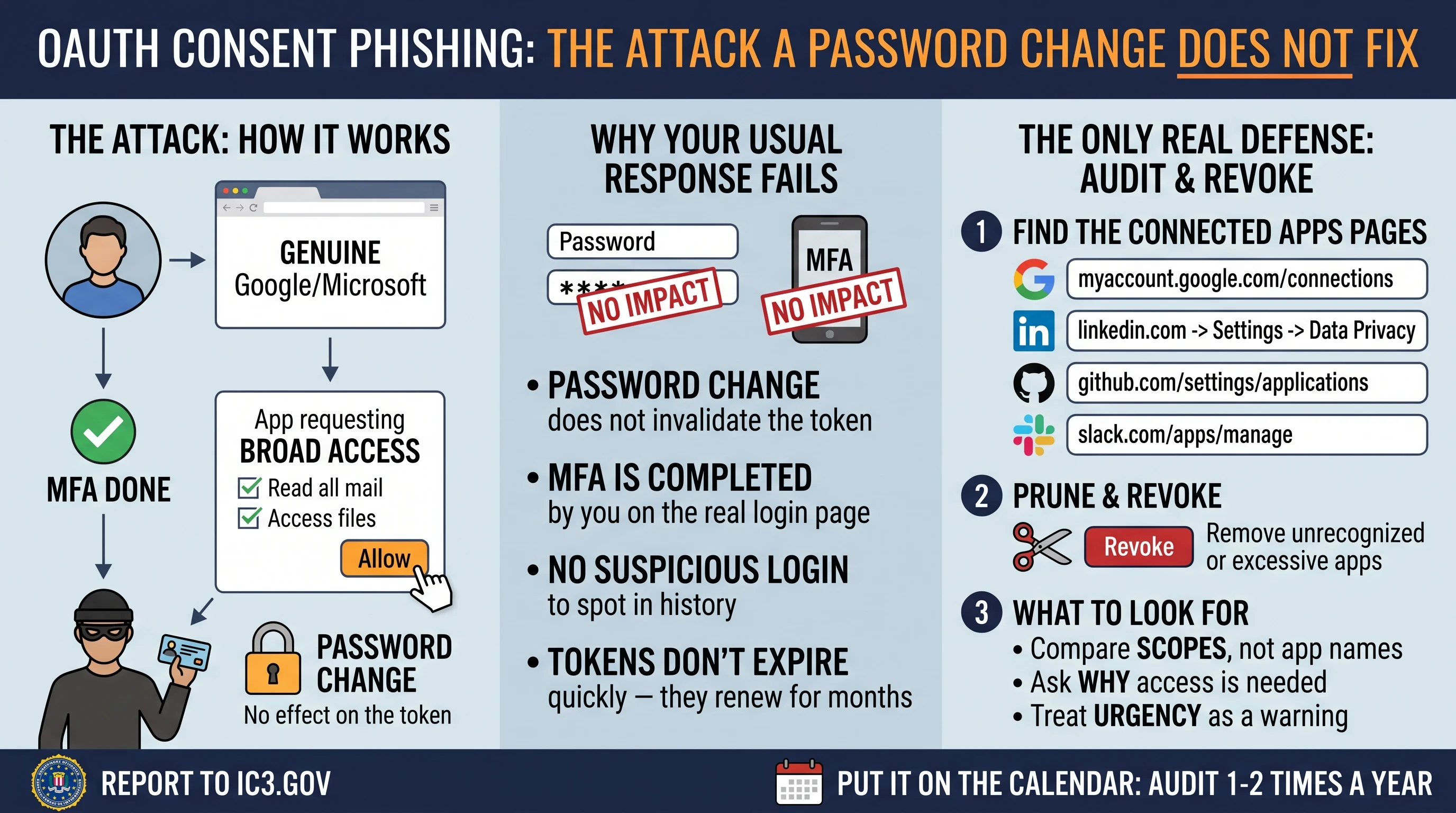
The FBI's Internet Crime Complaint Center published PSA I-090126 on September 1, 2026, and it describes an attack that quietly defeats the two things most people rely on: changing your password, and having multi-factor authentication turned on.
Neither one helps here. That is not a flaw in either - it is that this attack never touches your password at all.
What consent phishing actually is
You have almost certainly done the legitimate version of this. You sign into some service with "Continue with Google," a permission screen appears listing what the app wants - read your email, see your files, post on your behalf - and you click Allow. That grant is an OAuth token. It is how a scheduling tool reads your calendar without ever knowing your password.
Consent phishing is the same flow with a hostile app at the end of it. The attacker registers a real application with a real provider, requests broad permissions, and sends you a link. You land on a genuine login page - the actual Google or Microsoft one, correct domain, valid certificate - and authenticate normally. Then the permission screen appears, and if you approve it, the attacker holds a token that reads your mail and files whenever it likes.
The IC3 is blunt about the consequence. The access "can only be revoked by the victim invalidating the token in their application security settings; not by changing the password."
Why your usual response does nothing
Think about what you would do if you suspected an account compromise. Change the password. Check MFA is on. Sign out other sessions, maybe.
None of that revokes an OAuth grant.
- Changing your password does not invalidate the token. The token was never derived from your password.
- MFA does not stop it. You completed MFA yourself, correctly, on the real login page. The attacker never needed to defeat it - you satisfied it and then handed over a key on the next screen.
- There is no suspicious login to spot. The app is calling an API with a valid token, not signing in from a strange country. Your login history looks clean.
- Nothing expires on a useful timescale. A refresh token can stay valid for months or longer, renewing itself quietly.
That last point is the one worth sitting with. This is not a break-in you notice and clean up. It is a key you handed out, filed under a permission screen you closed and forgot - genuinely out of sight, out of mind.
Who is being targeted
The PSA names prominent individuals, their family members, and personal acquaintances, approached through ordinary commercial messaging apps rather than email. The pretexts impersonate government officials, media figures, and event coordinators, and the ask is mundane: review this document, verify your identity, confirm attendance.
Family and acquaintances are in that list deliberately. If you are hard to reach directly, the people around you are the way in.
Go audit your grants - this is the useful part
Whether or not you have been targeted, this is worth twenty minutes. Most people have not looked at these lists in years, and find things they no longer recognize: a trial from four jobs ago, a plugin that asked for far more than it needed, a "free analyzer" that still reads everything.
- Google - myaccount.google.com/connections. Sort by access level. Anything holding Gmail or Drive read access deserves a hard second look.
- Microsoft / Entra - myapps.microsoft.com, then My Account -> Privacy -> Apps and services.
- LinkedIn - Settings -> Data Privacy -> Permitted services.
- GitHub - Authorized OAuth Apps, and check Installed GitHub Apps separately - they are two different lists and people routinely check only one.
- Dropbox, Slack, Zoom, Meta - all keep an equivalent connected-apps page.
Revoke anything you do not actively use. Revocation is instant and free; if you break something you still need, you reauthorize it in a click. That asymmetry is the whole argument for being aggressive here.
What good scrutiny looks like
The moment that matters is the permission screen, and it is over in about two seconds. Slow it down:
- Read the scopes, not the app name. The name is chosen by whoever registered the app and can be anything. The permissions are the truth. A PDF viewer does not need to send mail as you.
- Ask why this needs an account at all. Reviewing a document rarely requires read/write access to your entire mailbox.
- Verify the sender out of band. Not by replying to the message - through a number or address you already had.
- Treat urgency as the tell. A deadline attached to a permission request is doing a job.
If you think you clicked Allow
- Revoke the grant first, on the provider's connected-apps page. Do this before anything else - until the token is gone, the access continues.
- Then change the password and re-check MFA. In that order; the reverse accomplishes nothing on its own.
- Check mailbox rules and forwarding. A common follow-up is a quiet auto-forward or a rule that files security alerts straight into the trash.
- Review sent mail. Access is frequently used to phish your contacts from your real address.
- Report it - your local FBI field office, or ic3.gov.
The honest tension
Worth saying plainly: OAuth consent is not the problem. It is a genuine improvement over the thing it replaced, which was typing your actual password into third-party sites and hoping. Every grant that reads your calendar without knowing your password is that design working.
The weakness is that one screen carries an enormous amount of meaning and gets about two seconds of attention, and that what it hands over is durable in a way people do not expect. A password is something you can change. A consent grant is something you have to remember you gave.
So put it on the calendar. Once or twice a year, open those pages and prune. It takes twenty minutes and it is the only maintenance that actually closes this class of access.