Home Networking Gear That Actually Matters for a Home Lab
When people start building a home lab, the money tends to flow toward the obvious things: a beefier server, more RAM, a shiny NAS. The network underneath all of it gets treated as an afterthought. That's backwards. Your switch, your cabling, and your wireless setup are what determine whether your lab feels snappy and reliable or whether it's a frustrating mess of dropped sessions and mystery latency. The good news is that solid networking gear is cheap relative to the compute it serves, and most of it lasts a decade or more.
This guide covers the stuff that genuinely moves the needle: good copper, a real access point, and why you should run a cable to anything that sits still. We won't cover PoE switches here because we already dug into those in our PoE camera guide.
Wired Beats Wi-Fi for Anything That Doesn't Move
This is the single most important habit to build. Wi-Fi is a shared, half-duplex medium that degrades with distance, interference, and the number of devices fighting for airtime. A wired link is a private, full-duplex lane with predictable latency measured in fractions of a millisecond. For a server, a Proxmox node, a NAS, or a desktop that lives on a desk, there is no upside to Wi-Fi.
The practical wins are concrete: backups finish in a fraction of the time, SSH sessions don't stutter, and you stop chasing phantom "the VM is slow" problems that turn out to be a microwave two rooms over. The rule we follow on every Tuxxin build: if it has a fixed location and a power cord, it gets a cable. Wi-Fi is for phones, laptops, and the things that genuinely roam.
Cat6 vs Cat6a: What You Actually Need
Cat6 handles gigabit comfortably and will do 10GbE over shorter runs (up to about 55 meters under good conditions). Cat6a is rated for full 10GbE at the complete 100-meter run and has tighter shielding against crosstalk. For patch cables inside a rack or between nearby gear, Cat6 is plenty. For in-wall runs you're going to leave in place for the next ten years, spend the small premium on Cat6a so the cabling never becomes the bottleneck when you eventually upgrade to 10-gig.
A few honest trade-offs: Cat6a is thicker and stiffer, so it's slightly more annoying to route in tight spaces, and shielded variants need proper grounding to pay off. For most home labs, unshielded (UTP) Cat6/Cat6a is the right call unless you're running cable alongside electrical lines or in a high-interference environment.
Cabling Picks

A 24-pack of pure copper (not copper-clad aluminum) patch cables is the workhorse of any rack; buy in bulk once and stop rummaging for a spare.
View on Amazon →
The slim 28AWG jacket bends easily and saves space behind a dense switch, while still carrying full 10GbE for short runs.
View on Amazon →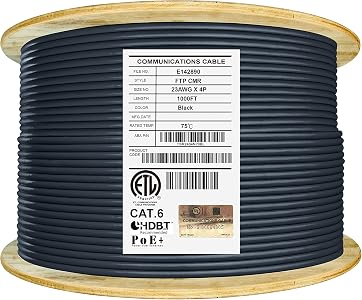
Solid-conductor, UL-certified riser-rated bulk cable is what you want for permanent in-wall runs; terminate it to keystones and never think about it again.
View on Amazon →
If your lab reaches a detached garage or shed, this OSP-rated cable is built to survive being buried and weathered, unlike indoor cable that rots outside.
View on Amazon →
A budget UV-resistant option for an exterior run to an access point or camera bracket when full direct-burial isn't required.
View on Amazon →
Gold-plated, well-terminated patch cables for the connections you actually want to trust; cheap connectors are a common source of intermittent link flaps.
View on Amazon →
Boring but essential: screw-in clips keep your runs tidy along baseboards and stop cables from becoming a tripping hazard or getting yanked out.
View on Amazon →The Access Point: Where Wireless Earns Its Keep
Even with a wired-first philosophy, you still need solid Wi-Fi for the devices that roam. The mistake most people make is leaning on the all-in-one router the ISP handed them. A dedicated access point with a real management plane gives you proper SSID control, VLAN tagging, and the ability to segment your IoT junk away from your lab and trusted clients.
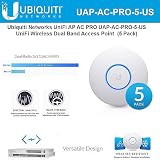
A dual-band enterprise-grade access point with a clean controller, VLAN support, and PoE power, so one cable carries both data and power; it's the AP we reach for when we want managed Wi-Fi without enterprise pricing. It's older 802.11ac rather than Wi-Fi 6, but for a home lab it's rock-solid and a genuine bargain.
View on Amazon →Pairing a UniFi AP with a properly segmented network is exactly the kind of setup we document over in Tuxxin's projects, and if you're managing networks for clients or multiple sites, our iNetPanel tooling is built for that workflow.
How to Prioritize Your Spend
If you're starting from scratch, run cable first. Permanent copper in the walls is the thing you'll regret skimping on, because pulling it again later is the worst job in the whole project. Patch cables and a good access point come next. Save the exotic 10GbE gear for when you actually have a workload that saturates a gigabit link, which for most home labs is rarer than the marketing suggests.
Most of the gear above goes on sale during Amazon Prime Day, June 20-24, 2026, so it's a good window to stock up on bulk cable and an access point in one order. Buy the copper once, do it right, and your network will quietly outlast several generations of the servers plugged into it.