
The Best GPUs for Running AI Models Locally (2026)
Running AI on your own hardware - chatbots, coding assistants, image generation - has gone from a research-lab project to something a home lab can do over a weekend. You keep your data private, pay no per-token API fees, and can tinker freely. The one part that actually matters when you buy hardware is the graphics card, and specifically how much VRAM it has. These picks are live during Amazon Prime Day, June 20-24, 2026.
The one rule: VRAM is king
A large language model has to fit in your GPU's memory to run fast. VRAM is the hard ceiling on how big a model you can load - everything else (CUDA cores, clock speed) only affects how fast it answers once it fits. A rough rule for 4-bit "quantized" models (the format almost everyone runs at home): figure roughly 0.6-0.7 GB of VRAM per billion parameters, plus a little headroom for context. That gives you a simple buying map:
- 8 GB - comfortably runs 7-8B models (great assistants), plus Stable Diffusion image generation.
- 16 GB - runs 8B and 13-14B easily, and 27-32B models at tighter quantization. The mainstream sweet spot.
- 24 GB - runs 32B models comfortably with room for big context, and 70B at aggressive quantization. The serious-hobbyist tier.
- 32 GB - 32B with ease, 70B at usable 4-bit, and the fastest generation you can get in a single consumer card.
One caveat that saves headaches: NVIDIA is the smooth path for local AI because the whole ecosystem targets CUDA first. AMD cards work via ROCm and have come a long way, but expect more setup. If you just want it to work, buy green.
How you'll actually run the models (the free software)
You don't need to touch Python. Three free tools cover almost everyone:
- Ollama - the simplest backend, on Windows, macOS, and Linux. Install it, then
ollama run llama3.1downloads and runs a model in one line. It also exposes a local API other apps can talk to. - LM Studio - a polished desktop app (Windows/macOS/Linux) with a built-in model browser: search for a model, click download, click load, start chatting. The friendliest "do it all from a UI" option.
- Open WebUI - a self-hosted, ChatGPT-style web interface (runs in Docker, popular on Linux home servers) that front-ends Ollama. You pull and manage models right from the browser and access it from any device on your network. This is the classic self-hoster setup.
(Jan and GPT4All are good alternative desktop apps; text-generation-webui is there for power users.) All of these pull from free, open-weight models - Llama 3.1/3.3 (Meta), Qwen 2.5 (7B/14B/32B/72B), Gemma 2 (9B/27B), Mistral and Mistral Nemo 12B, Phi-4 14B, and the DeepSeek-R1 reasoning distills (1.5B up to 70B). All free to download and run.
16 GB: the mainstream local-AI cards
For most people this is the right buy. 16 GB runs an 8B model instantly, a 14B comfortably, and lets you stretch to a 32B at lower quant - plus it chews through SDXL and Flux image generation.
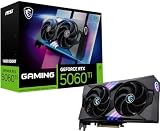
the value entry point. 16 GB of fast GDDR7 for the lowest price here; ideal for Llama 3.1 8B, Qwen 2.5 14B, Gemma 2 9B, and Stable Diffusion.
View on Amazon →
a small-form-factor 5070 Ti that fits mini/compact builds; meaningfully faster than the 5060 Ti while keeping the same 16 GB. Great for a quiet desktop AI box.
View on Amazon →
a beefier-cooled 5070 Ti for sustained workloads; runs 14B models snappily and 27-32B at Q4 with a trimmed context.
View on Amazon →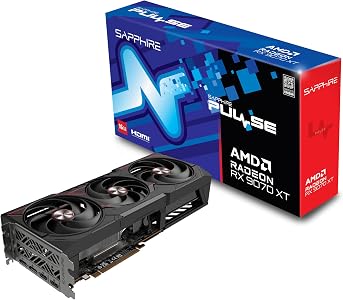
strong, well-priced 16 GB hardware if you're comfortable on the AMD/ROCm path. Excellent for gaming too; just know AI tooling is a bit less plug-and-play than CUDA.
View on Amazon →24 GB: the local-LLM value champion

years on, the 3090 is still the enthusiast favorite for local AI, and it's purely because of that 24 GB. It runs 32B models like Qwen 2.5 32B or the DeepSeek-R1 32B distill comfortably, handles big context windows, and can even load a 70B at low quant. With 10,496 CUDA cores it's no slouch on speed either. If you want the most local-AI capability per dollar, this is it.
View on Amazon →32 GB: no compromises

the top of the consumer stack. 32 GB of GDDR7 runs 32B models with huge context for fast, agentic workflows, a 70B at usable 4-bit, and generates images in a blink. Overkill for a chatbot; exactly right if local AI is the whole point of the build.
View on Amazon →Which one should you buy?
Most home-AI builders should grab a 16 GB card (5060 Ti or 5070 Ti) and run 8-14B models with Ollama or LM Studio - it's plenty for a genuinely useful private assistant and image generation. If you're chasing 32B-and-up models or want to run several at once, the 24 GB 3090 is the smart-money pick, and the 32 GB 5090 is the do-everything halo card. Whichever you choose, pair it with a capable host - see our home-lab PC guide if you're building the rest of the machine.
Running your own models is squarely in Tuxxin's wheelhouse - private, self-hosted, no subscriptions. See what we build with this kind of stack over on Tuxxin's projects.