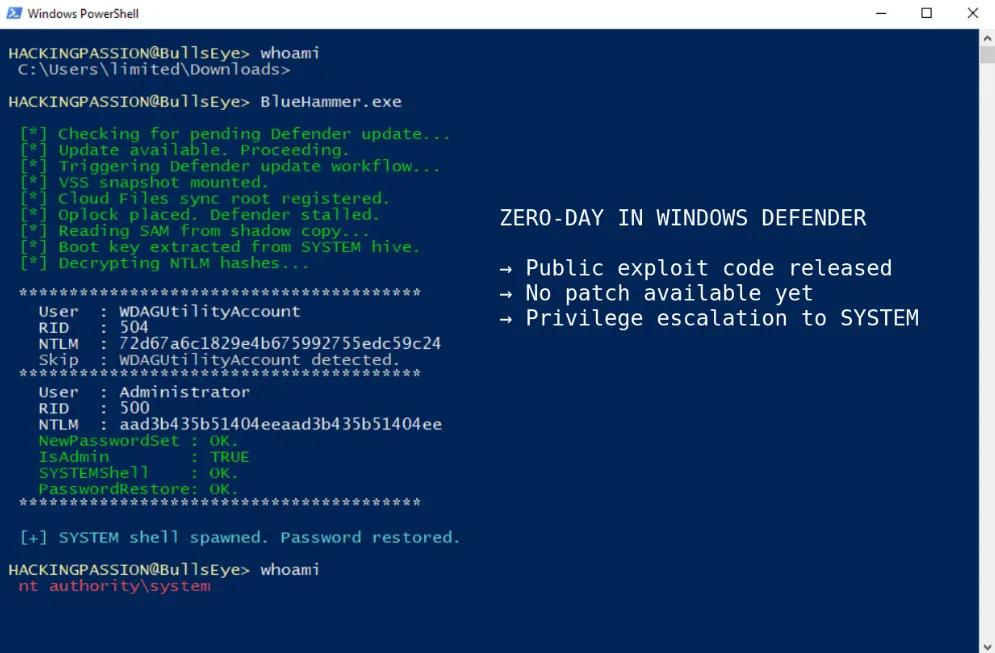
A Chink in Windows Defender's Armor: The BlueHammer Zero-Day Explained
Alright, tech fam, let's talk about something that recently popped up on our radar and is worth a quick heads-up. You know how we always preach about keeping your systems updated and secure? Well, a recent discovery highlighted just why that's so crucial, even when you're relying on built-in defenses like Windows Defender.
We're talking about something dubbed "BlueHammer," a pretty clever zero-day vulnerability that briefly gave us all a reason to double-check our security. Big shoutout to the folks over at HackingPassion.com for their detailed dive into this one; it's a great read if you want the nitty-gritty.
What Exactly Happened? (The BlueHammer Breakdown)
So, what was BlueHammer all about? In short, it was a local privilege escalation vulnerability found in Windows Defender's Antimalware Scan Interface (AMSI). Now, don't let the jargon scare you. What it means is that if an attacker managed to get even a low-level foothold on your Windows machine, this particular bug could have allowed them to escalate their privileges all the way up to "SYSTEM" level - essentially giving them full control over your computer.
Think of it like this: Windows Defender is your digital bodyguard, right? This vulnerability was like finding a secret back door in the bodyguard's uniform that an intruder could use to sneak into the control room. Pretty wild stuff, especially since it was a "zero-day," meaning Microsoft didn't know about it until it was discovered and exploited (or had the potential to be).
The good news? The security researcher, Filip Dragovic, who found BlueHammer (now officially CVE-2023-21768), did the responsible thing and reported it to Microsoft. They've since patched it up, so as long as your Windows is up-to-date, you're protected from this specific threat. But it's a stark reminder that even the best built-in defenses can have their moments.
Why This Matters to You (And Why We're Talking About It)
At Tuxxin, we've been helping Orlando businesses and individuals with their IT solutions since 2011, and we've seen firsthand how important a multi-layered security approach is. While Windows Defender has gotten significantly better over the years, relying solely on it can sometimes leave you exposed to these kinds of clever attacks. It's like having a great front door lock but forgetting about the windows.
This is where a robust, third-party antivirus solution comes into play. It acts as an additional layer of defense, often catching things that Windows Defender might miss or providing advanced features like firewall protection, VPNs, and identity theft monitoring that go beyond basic malware scanning.
Tuxxin's Top Picks: Our Recommended Antivirus Software
We've got hands-on experience with countless security solutions, and we always recommend what gives you the best bang for your buck and the most peace of mind. Here are a few of our go-to choices for comprehensive protection:

Bitdefender Total Security: If you're looking for an all-around champion, Bitdefender is consistently at the top of the pack. It's incredibly effective at catching malware, has minimal impact on system performance, and comes packed with features like a VPN, parental controls, and webcam protection. It's what we often recommend to clients who want robust, set-it-and-forget-it security. Check out Bitdefender Total Security on Amazon.
View on Amazon →
Norton 360 Deluxe: Norton has been around the block, and for good reason. Their 360 suite offers much more than just antivirus; you get a VPN, dark web monitoring, a password manager, and cloud backup. It's a fantastic value if you want a complete security package that covers multiple devices. Explore Norton 360 Deluxe on Amazon.
View on Amazon →
Malwarebytes Premium: While often thought of as a secondary scanner, Malwarebytes Premium has evolved into a full-fledged antivirus solution that's excellent at detecting and blocking zero-day exploits and ransomware. It's lightweight, effective, and fantastic at cleaning up infections that might have slipped past other defenses. We often pair this with Windows Defender for an extra layer of peace of mind. Get Malwarebytes Premium on Amazon.
View on Amazon →Stay Safe Out There, Orlando!
The bottom line is this: while Windows Defender is a solid baseline, it's smart to consider additional layers of security. Keep your Windows operating system and all your software updated, and think about investing in a quality third-party antivirus solution. It's a small price to pay for protecting your data, your privacy, and your peace of mind.
Got questions about your current setup or need a hand choosing the right security for your home or business? You know who to call - we're here to help!